🔌 Browser Extension
Capture bugs directly from any webpage with the Chrome/Edge browser extension — annotated screenshots, screen recordings, console/network logs, one-click bug creation, and a sidebar inside Jira.
🌟 Overview#
The Sniffer Browser Extension lets team members capture bugs on the spot while browsing any website. Click the extension icon to open the capture panel, which records a screenshot (with annotation tools), console logs, network requests, action timeline, and device information — then creates a bug in your Sniffer project with a single click.
The extension also lights up inside Jira, adding a sidebar to bug-detail pages where engineers can review the captured Sniffer context for the open ticket without leaving Jira.
Captured bugs automatically sync to 🔗 Jira and appear on the 📋 Task Board .
📦 Installation#
The extension is available as an unpacked Chrome extension. Setup instructions are in your project at Settings → Extension Unpacked (/sf/projects/:id/settings/extension-unpacked).
Steps#
- Download the extension package from your Sniffer project settings.
- Open Chrome and navigate to
chrome://extensions. - Enable Developer Mode (toggle in the top-right).
- Click Load Unpacked and select the downloaded extension folder.
- The Sniffer icon appears in your browser toolbar.
- Click the icon and sign in with your Sniffer credentials.
Supported Browsers: Google Chrome, Microsoft Edge (Chromium-based, Manifest V3).
🎛️ Popup UI#
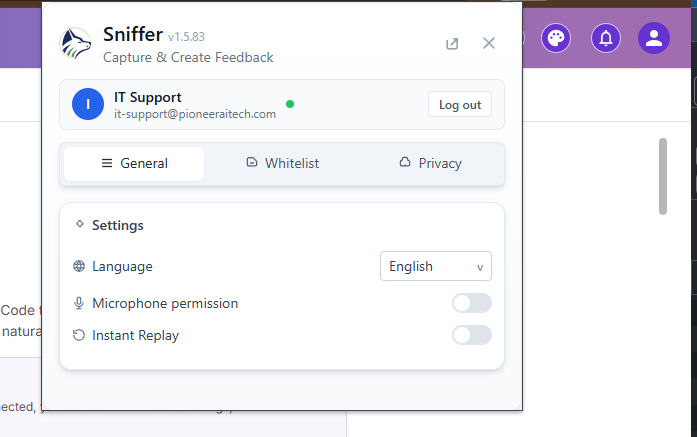
Click the toolbar icon to open the popup. It has three tabs:
1. 👤 General Tab#
- Authentication status with user avatar and email
- Language selector (English, Arabic with RTL support, more)
- Version number display
- Login / Logout buttons
- Open Web App link to
https://snifferweb.com
2. 🛡️ Whitelist Tab#
URL whitelist management — controls where the extension is allowed to capture data.
- Add entry form with type selector:
WILDCARD— Pattern matching (e.g.,*.example.com)EXACT— Exact URL match
- List of whitelisted entries with remove buttons
- Save button persists to chrome.storage.local
3. 🔒 Privacy Tab#
- Masking configuration for sensitive data (emails, passwords, credit cards)
- Toggle sensitive-field masking
- Custom key input for additional fields to mask
- Floating button position selector (top, bottom, left, right)
- Notification preference toggles
- Replay mode selector — full vs. focus capture
- Instant replay enable/disable
📸 Capture Capabilities#
🖼️ Screenshots#
🖼️ Insert image of the screenshot annotation tool overlay.
🎥 Screen Recording#
📟 Console Logs#
🌐 Network Logs#
📱 Device Context#
Automatically captured:
- Operating System and version
- Browser name and version
- Screen resolution
- User agent string
- Current page URL
- Hardware info (CPU cores, memory)
- Language and timezone
🖥️ DOM Snapshot#
Captures the HTML state of the page at the time of the bug report. Includes computed styles for the focused element.
🖱️ Action Timeline#
Chronological list of user interactions leading up to the capture — clicks, scrolls, inputs, navigations.
🐛 Creating a Bug from the Extension#
After capturing data, a bug creation form appears:
🖼️ Insert image of the in-extension bug creation form with captured screenshot preview.
Click Create — the bug is created in your Sniffer project with all captured data attached. If Jira sync is active, a Jira ticket is created automatically.
🔄 Auto-Capture Mode#
The extension can run in the background and automatically capture errors:
- JavaScript exceptions trigger automatic capture
- Network failures are logged passively
- Captured data is queued for review before creating bugs
- Configurable threshold (don’t auto-capture for noisy 3rd-party errors)
🧩 Jira Integration (Inside Jira UI)#
When you open a Jira issue with the extension installed, a Sniffer sidebar appears on the right.
🖼️ Insert image of the Jira issue page with the Sniffer sidebar open on the right.
🔐 Permissions & Privacy#
- The extension requests
activeTab,storage,webRequest, andtabspermissions - All captured data is uploaded over HTTPS to your Sniffer instance
- The Privacy tab lets you define masking rules; matching fields are scrubbed before upload
- The Whitelist tab controls where the extension is allowed to capture — by default only the URL prefixes you specify
- Auth is HttpOnly-cookie based — tokens are never exposed to page JavaScript